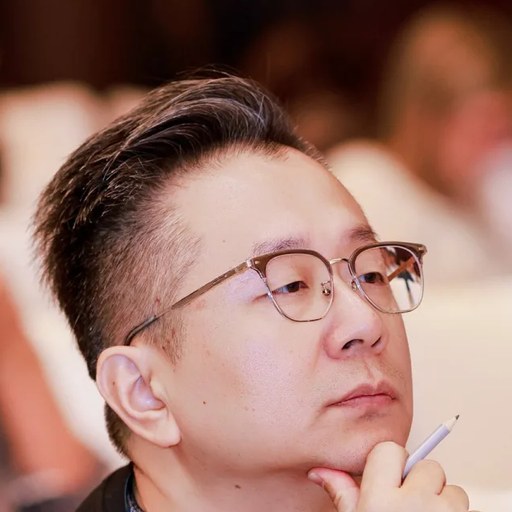
AI-generated headshots have become one more option alongside traditional portrait photography — not a replacement, but an alternative that can be quicker and more flexible for some uses. A LinkedIn image or a set of placeholder team portraits can be drafted in a single session instead of waiting for a studio booking.
Yet there's a catch: generic prompts produce generic results. The AI headshots flooding social media often suffer from the same problem — they look vaguely corporate, but unmemorable. They lack personality. They feel slightly off in ways that are hard to articulate but impossible to ignore.
The difference between a forgettable AI headshot and a compelling one comes down to precision. This guide walks you through the exact prompt architecture, technical vocabulary, and structural patterns for professional-looking headshots — on LinkedIn, in corporate bios, on team pages, and anywhere else professional identity matters.
Why People Use AI for Professional Headshots
Before diving into prompts, here is why some people choose AI for professional portraiture, and where a photographer is still the better choice.
Cost: Studio headshot pricing varies widely by market and photographer, and it is charged per person or per session. AI tools usually charge by subscription or credits instead, which can work out cheaper for larger groups. Compare current quotes from local photographers with your tool's pricing before deciding.
Speed: A studio shoot depends on booking availability and retouching time. An AI draft can be generated and revised in one sitting.
Control: With traditional photography, you're at the mercy of lighting conditions, camera settings, and the photographer's interpretation. AI lets you describe each variable in words — lighting angle, fabric texture, background blur, expression — though the model will not always follow every detail exactly.
Iteration: Changed your mind about the background? Different lighting mood? Different outfit? In traditional photography, that's a reschoot. In AI, it's a prompt tweak.
Flexibility: AI scales without friction. One headshot or five hundred — the process is identical. Try it for a single LinkedIn refresh or generate consistent portraits for your entire company.
The tradeoff? AI headshots require more precision in prompting. Traditional photography requires minimal direction. AI requires specificity about everything.
The Challenge: Why Generic AI Headshots Fail
Before learning the architecture, understand what goes wrong with naive prompts like:
"Professional headshot of a businessman, LinkedIn, high quality"
Three predictable failures:
1. Undefined lighting creates flat, unflattering faces. Without specific light descriptors, AI defaults to ambiguous lighting that fails to define face structure, creates weird shadows, or renders skin with a dull, lifeless quality.
2. Missing quality descriptors produce inconsistent technical quality. "High quality" means nothing. Is it a smartphone photo? Professional DSLR? Cinema camera? Different tools produce radically different aesthetics. Without naming the photography discipline, you get randomness.
3. No background specification means corporate blandness. A neutral background isn't specified as "blurred office setting" or "gradient background" — it's left undefined, resulting in strange, distracting, or amateurish backdrops.
The solution is the five-layer prompt architecture below.
Core Prompt Architecture for Professional Headshots
Every compelling professional headshot follows this five-layer structure. Master each layer, stack them together, and the quality jumps dramatically.
Layer 1: Subject Definition
Start with specifics about the subject of the headshot. Not just "a person" — give the model enough detail to render a distinct, coherent character.
Examples:
- "45-year-old Black woman with shoulder-length braided hair, warm smile, looking directly at camera"
- "32-year-old South Asian man with short dark hair, light stubble, thoughtful expression looking slightly upward"
- "55-year-old white man with salt-and-pepper hair, confidence in eyes, slight warm smile"
Key principle: Specificity over vagueness. "A person" produces generic faces. Specific descriptors produce distinct, believable characters. Expression and posture matter most here — they are the two variables that decide whether a headshot reads as professional. Compare "a person for a LinkedIn profile" with "a professional in their mid-30s, confident expression, direct eye contact with the camera."
Layer 2: Professional Vibe
Define the professional context and the impression the headshot should convey.
Examples:
- "Technology startup founder, radiating approachability and innovation, calm confidence"
- "Corporate finance executive, exuding authority and trustworthiness, composed professionalism"
- "Creative director in marketing, conveying confidence and visionary thinking, intellectual warmth"
- "Healthcare professional (therapist/counselor), projecting empathy and trustworthiness, open attentiveness"
- "Academic researcher, radiating intellectual curiosity and approachability, thoughtful intensity"
Layer 3: Lighting Specification
This is the most critical layer for believable headshots. Photography lighting has specific vocabulary — use it.
Standard professional lighting setups:
- Rembrandt lighting: One key light at 45-degree angle creating a small triangle of light on the shadowed cheek (classic, flattering, professional)
- Butterfly lighting: Key light directly in front, slightly above (flatters most face shapes, reduces aging, common in corporate photography)
- Loop lighting: Key light 30-45 degrees to the side, slightly above (natural, versatile, forgiving)
- Split lighting: Hard light from one side, shadow on the other (dramatic, intense, less common for corporate)
Light quality descriptors:
- "Soft diffused light" — bounced through softboxes (flattering, forgiving)
- "Natural window light" — from large windows (organic, warm, very popular)
- "Studio ring light" — soft wraparound light (common for headshots, reduces aging)
- "Golden hour light" — warm, directional (expensive to recreate, very flattering)
Shadow intensity:
- "Minimal shadows, brightened fill light" — very bright, flattering, less dramatic
- "Natural shadows, subtle fill" — balanced, traditional professional
- "Deeper shadows, controlled fill" — moodier, more dramatic
Best default for corporate headshots:
Or:
Layer 4: Technical Photography Descriptors
These control the photographic technique and ensure the result looks like professional photography, not amateur smartphone snap.
Camera and lens specifications:
- "Shot on Canon 5D Mark IV with 85mm f/1.4 lens" (professional standard for headshots)
- "Shot on Sony A7R IV, 85mm lens" (high-end corporate standard)
- "Professional DSLR, 85mm prime lens" (generic but effective)
Depth of field:
- "Shallow depth of field, f/1.8 aperture" (sharp subject, beautifully blurred background)
- "Depth of field f/2.8" (slight subject blur, detailed background)
- "Deep focus, f/8" (entire head sharp, less flattering)
For headshots, always choose shallow — f/1.4 to f/2.0.
Focus sharpness:
- "Sharp focus on eyes and face, tack sharp"
- "Perfectly in focus throughout face"
- "Crisp eye detail, sharp facial features"
Color grading:
- "Warm color grading, enhanced skin tones"
- "Cool professional color grading, neutral whites"
- "Slightly desaturated background, warm subject"
- "Vibrant colors, enhanced lips and eyes"
Resolution and quality:
- "8K photograph"
- "High resolution professional photograph"
- "Magazine-quality headshot"
- "Professional photography, sharp detail, crisp quality"
Complete Layer 4 example:
Layer 5: Background and Styling
Specify the background, clothing, and any props.
Background options:
- "Soft neutral gray background" (classic, professional, timeless)
- "Subtle gradient background, light to medium gray" (depth without distraction)
- "Blurred office environment, bookshelf background" (contextual, professional)
- "Clean white background with soft drop shadow" (modern, minimal)
- "Soft bokeh background, diffused neutral tones" (flattering, modern)
- "Elegant garden background, heavily blurred" (sophisticated, warm)
Matching the background to the context:
| Background Type | Best Use Case | Prompt Keywords |
|---|---|---|
| Pure white | Tech, startup, editorial | "pure white seamless background" |
| Light gray gradient | Corporate, consulting, finance | "soft gray studio gradient background" |
| Blurred environment | Creative, agency, informal | "shallow depth of field, blurred office bokeh" |
| Dark neutral | Executive, senior leadership | "dark charcoal seamless background" |
Avoid patterned backgrounds, outdoor environments, and anything with color unless you're going for a specific branded look.
Clothing:
- "Professional business attire, tailored blazer"
- "Business casual, collared shirt, no tie"
- "Corporate executive suit and tie"
- "Smart casual, quality knit sweater"
- "Professional dress, subtle colors"
Styling:
- "Professional grooming, polished appearance"
- "Well-styled hair, natural makeup"
- "Subtle jewelry, professional minimalism"
- "Confident posture, relaxed shoulders"
The Short-Form Formula
When you don't need every layer spelled out, this compressed version covers the essentials:
A fully built example:
"A confident professional woman in her early 40s, warm genuine smile, direct eye contact, wearing a navy blazer, butterfly studio lighting with large softbox, smooth soft gray gradient background, shot on Canon EOS R5 with 85mm f/1.8 lens, slight depth of field, natural professional skin retouching, photorealistic, LinkedIn profile headshot, ultra high definition"
14 Ready-to-Use Prompt Templates
Here are complete, copy-paste templates for different professional contexts:
Template 1: Tech/Startup Founder (Warm, Approachable)
Template 2: Corporate Finance Executive (Authoritative, Trustworthy)
Template 3: Creative Director/Designer (Confident, Visionary)
Template 4: Healthcare Professional (Empathetic, Trustworthy)
Template 5: Academic/Professor (Intellectual, Approachable)
Template 6: Sales/Business Development (Energetic, Approachable)
Short-Form Prompts for More Roles
These shorter prompts cover contexts the long templates don't. Adjust the age, attire, and expression details to fit your needs.
Classic Corporate
"Professional executive portrait, confident posture, subtle smile, direct gaze, Rembrandt studio lighting, pure white seamless background, navy suit, 85mm portrait lens, shallow depth of field, clean professional retouching, photorealistic headshot, 4K"
Tech Professional
"Contemporary tech industry headshot, smart casual attire, genuine warm smile, shallow depth of field with blurred modern office background, natural window light style, candid professionalism, high resolution portrait"
Attorney
"Legal professional portrait, serious authoritative expression, formal business attire, dark sophisticated background, dramatic studio lighting with key light, professional law firm headshot quality, high resolution"
Actor or Performer
"Professional actor headshot, expressive genuine emotion, simple neutral background, dramatic theatrical lighting, compelling direct gaze, high-contrast professional photography, commercial headshot quality"
Speaker or Author
"Author or public speaker professional headshot, charismatic confident expression, smart professional attire, deep blurred background with warm tone, dramatic light from one side, compelling personality portrait"
Entrepreneur
"Modern entrepreneur headshot, warm ambitious expression, contemporary professional style, clean minimal background, natural light aesthetic, genuine personality, high-end retouching, LinkedIn ready"
Mature Professional
"Distinguished senior professional headshot, experienced confident expression, silver hair, classic professional attire, soft studio lighting, neutral background, natural aging, dignified executive portrait quality"
Young Professional
"Young professional first job headshot, eager confident expression, business professional attire, clean white background, studio lighting, polished but approachable, entry-level professional photography quality"
Advanced Techniques for Better Results
Clothing Strategies by Industry
Different industries telegraph professionalism differently. Match your clothing to your industry context:
- Finance/Law: Dark suit, conservative tie, traditional polish
- Tech/Startup: Business casual, quality knit sweater, contemporary polish
- Creative/Marketing: Modern blazer or quality casual, color option, contemporary grooming
- Healthcare: Professional dress/shirt in calm colors (blue, sage green), approachable warmth
- Academic: Blazer, quality shirt, scholarly composition
- Executive: Tailored suit, subtle accessories, power posture
Specific clothing descriptions produce far better results than generic ones:
| Instead of | Use |
|---|---|
| "business clothes" | "structured navy blazer over white dress shirt" |
| "professional attire" | "charcoal wool suit, light blue tie, pocket square" |
| "casual professional" | "light blue Oxford shirt, top button open" |
| "formal" | "black suit, crisp white shirt, minimal accessories" |
Expression Control
AI struggles with inconsistent expressions. Be extremely specific:
- "Genuine warm smile with teeth slightly visible" (vs. just "smiling")
- "Serious composed expression, slight subtle smile" (vs. "serious")
- "Engaged, active listening expression, soft eyes" (vs. "thoughtful")
- "Confident direct gaze at camera, warm confidence" (vs. "looking at camera")
- "Professional approachability, genuine warmth, open face" (vs. "friendly")
- "Subtle closed-mouth smile, eyes slightly crinkled, approachable warmth"
- "Confident neutral expression, slight upturn at corners of mouth, focused gaze"
- "Genuine open smile, teeth showing, natural laugh lines, authentic warmth"
Retouching Level and Skin Quality
Headshots exist on a spectrum from raw documentary to heavily retouched. Your prompt should indicate where on that spectrum you want to land:
- Natural/minimal: "natural skin texture, minimal retouching, authentic look"
- Clean professional: "smooth skin, even tone, subtle post-processing"
- High-end commercial: "high-end retouching, flawless skin, commercial photography quality"
AI often over-smooths skin, creating an uncanny plastic look. If that happens, add "natural skin pores and texture visible, not over-retouched" or "photorealistic skin texture, three-dimensional facial features."
Avoiding Common AI Headshot Failures
Failure 1: Asymmetrical faces or wrong proportions
- Fix: Add "symmetrical, perfect facial proportions"
- Fix: Add "anatomically correct, natural face structure"
Failure 2: Uncanny eyes (too big, wrong focus, creepy stare)
- Fix: Add "sharp focus on eyes, realistic eye expression, natural gaze"
- Fix: Add "eyes showing intelligence and warmth, natural eye contact"
- Fix: Add "natural catchlights, direct gaze into lens"
- Fix: Try "eyes slightly squinted with genuine expression" — this reads as more authentic than wide-open eyes
- Fix: Specify makeup: "natural eye makeup" or "no makeup, natural lashes"
Failure 3: Weird teeth/smile
- Fix: Be specific: "genuine smile with teeth slightly visible" not just "smiling"
- Fix: Add "natural subtle smile" if teeth aren't necessary
Failure 4: Bad skin rendering (too smooth/plastic, weird texture)
- Fix: Add "realistic skin texture, natural complexion, healthy skin appearance"
- Fix: Add "professional light revealing natural skin, enhanced skin tones"
Failure 5: Unflattering background that distracts
- Fix: Specify "beautifully blurred background" or "studio background with professional depth of field"
- Fix: Add background far distance from subject
Failure 6: Awkward crop
- Fix: Professional headshots typically frame from the chest or shoulders up, with the face occupying roughly the top third to half of the frame. Add "head and shoulders portrait, face centered in upper third of frame"
- Fix: Headshots that cut off awkwardly at the neck or include too much body look amateur. Add "shoulders and chest visible, professional framing"
Failure 7: Artificial-looking hair
- Fix: Describe the face before the hair. Hair details without an anchored face description tend to come out inconsistent or artificial
Failure 8: Overloaded quality keywords
- Fix: Stacking "8K ultra HD photorealistic professional commercial" doesn't help and can confuse the model. One or two quality anchors are enough
Tips for Gemini
Gemini responds particularly well to photography-language prompts:
- Use camera and lens language. Terms like "85mm portrait lens," "f/2.0 bokeh," and "Canon EOS R5 sensor" push output toward photorealistic results.
- Request multiple variations. Prompt for "four variations of this headshot with slightly different expressions" to get options without writing four separate prompts.
- Specify the aspect ratio. For LinkedIn, "1:1 square crop" works best. For wider website use, "4:5 portrait aspect ratio" gives flexibility.
- Layer lighting descriptions. Instead of "studio lighting," try "large octabox softbox key light, silver reflector fill, hair light from behind" for more dimensional, realistic results.
Industry-Specific Variations
For LinkedIn Profile Photos
LinkedIn has specific constraints: square crop, roughly head-and-shoulders framing. Adjust your prompt:
For Corporate Team Pages
Team pages often benefit from subtle environmental context. Add:
For Executive Bios and Conference Speaking
Speaking professionals benefit from slight mood:
Style Matrix by Context
Different contexts call for different headshot styles. Use this as a quick reference when adapting a template:
| Context | Background | Lighting | Expression | Style |
|---|---|---|---|---|
| Neutral gray or white | Soft, even studio | Warm, approachable smile | Clean, modern | |
| Corporate Website | White or brand color | Professional softbox | Confident, composed | Polished, consistent |
| Speaker Bio | Dark or dramatic | Dramatic, directional | Charismatic, engaging | Bold, memorable |
| Author Bio | Blurred environment | Natural, window light | Thoughtful, authentic | Candid, personal |
| Press Release | Pure white | Flat even lighting | Neutral, newsworthy | Editorial, clean |
Professional vs. AI: When Each Works Best
Choose AI headshots when:
- You need a quick turnaround
- Per-person studio cost adds up for a larger group
- You want to iterate on many variations
- You want a consistent look across a team page
- You want to direct lighting, wardrobe, and background in words
Choose professional photography when:
- Maximum realism is critical (CEO publication photo)
- You need physical context (candid office environment)
- Budget isn't constrained
- You want irreproducible authenticity (something AI can't match)
- You're creating art/portfolio pieces
As a rough guide, AI drafts can suit LinkedIn, internal bios, and team pages, while a professional photographer remains the safer choice for investor materials, press, and other high-stakes external use.
FAQ: Professional Headshot Prompting
Q: Can I use AI headshots on LinkedIn? A: Check LinkedIn's current profile-photo rules before uploading. An AI headshot is a generated portrait, not a photograph — if you use a photo as a reference, treat it as a loose character reference; likeness may vary. Be transparent that the image is AI-generated if asked.
Q: How many attempts does it take to get a good result? A: Typically 3–5 iterations of the same core prompt with small adjustments. The most common refinements are to expression ("more confident," "less formal smile") and lighting ("softer shadows," "more dramatic contrast").
Q: What resolution should I request? A: For professional use, specify "high resolution" or "4K" in the prompt. Most AI generators produce images suitable for web use at full output. For print, upscale with a tool like Topaz AI or Adobe Firefly's enhance feature.
Q: Do AI headshots look real? A: With careful prompting, modern AI-generated headshots are very convincing at web resolution and normal viewing distances. Look closely and you may find subtle signs — slightly imperfect teeth, unusual background details — but for most professional use cases the output is sufficient.
Q: How do I ensure diversity in corporate AI headshots? A: Be specific in Layer 1 (subject definition). Include specific ethnicities, age ranges, and features. Test different variations to ensure representation. AI defaults to certain demographics — overspecify to avoid defaults.
Q: What's the best image size for professional use? A: LinkedIn prefers 400x400 pixels or larger (up to 4000x4000). Export at 2x scale (800x800 minimum) for flexibility. Corporate bios often use different aspect ratios — generate wide enough to crop safely.
Q: Can I edit the generated headshot further? A: Absolutely. Use Photoshop, Lightroom, or simpler tools to: adjust color grading, crop composition, enhance eyes/brightness slightly, remove any artifacts. Most professionals polish AI headshots minimally before use.
Q: What's the legal situation with AI headshots? A: You own the generated images. If creating headshots of other people (employees, clients), clarify that you're using AI-generated portraits. Disclose in professional contexts where it matters. No major legal barriers exist — transparency matters more than legality.
Q: How do I prompt for different ethnicities authentically? A: Be specific in Layer 1. Use actual ethnicity descriptors: "South Asian," "East Asian," "Black," "Hispanic," "Middle Eastern," "East African," etc. Avoid stereotypical descriptors. Example: Don't describe "ethnicity through clothing" — describe actual ethnic identity.
Q: File naming and organization best practices?
A: Organize by project: LinkedIn_2026_[Name].png, Corporate_Team_[Department]_[Name].png, Conference_Speaker_[Name]_[Date].png. Include metadata in filename for searchability. Create organized folders by project type.
Q: What about sharing and licensing? A: Generated images are typically for personal use. If your AI tool has commercial license terms, read them. Most allow commercial use of generated content. Cloudinary, Adobe Express, Midjourney vary — check your specific tool's terms.
Actionable Tips for Best Results
-
Start conservative, iterate boldly. Generate the baseline version, then try 10 variations with subtle tweaks. AI iteration is free.
-
Focus on eyes first. Generate 5 versions and pick based on eye quality first. Everything else is secondary.
-
Lighting matters most. If you're picking between versions, always choose the better lighting version over other variations.
-
Seasonal color refresh. Regenerate every 6-12 months. LinkedIn prefers recent photos. Maintain your professional image currency.
-
Save raw files. Export at highest resolution available, then crop/edit as needed. Never work from already-cropped or compressed versions.
-
Test before committing. Try LinkedIn upload preview, corporate site preview, etc. before finalizing. Visual context matters.
-
Gather feedback. Send 3 versions to a trusted colleague. Professional headshots are subjective — outside perspective prevents echo chamber choices.
Quick-Start: Your First AI Headshot in 3 Steps
If you want results right now, here's the simplest path:
Step 1: Copy this base prompt:
"Professional headshot, confident warm expression, direct eye contact, studio lighting, neutral gray background, business attire, 85mm portrait quality, photorealistic"
Step 2: Add one specific detail about your context:
- For tech: add "smart casual, approachable"
- For finance: add "formal suit, authoritative"
- For creative: add "artistic personality, expressive"
Step 3: Generate 3–4 variants and select the best expression. Then refine the winner with one round of adjustments.
Conclusion
AI professional headshots have moved from novelty to professional standard in 2026. The difference between a forgettable generated image and a compelling professional portrait comes down to prompt precision.
Bookmark this guide. The templates above are copy-paste ready. Start with the template closest to your industry, customize Layers 1-2 with your actual details, and generate 10 variations. Pick the best version, polish it lightly in Photoshop if needed, and you have a usable professional headshot draft.
To go further, our portrait lighting guide and portrait poses and composition guide cover the lighting and framing side in more depth.
The future of professional portraiture is collaborative — you directing the creative vision, AI executing with precision, and you retaining full creative control. Welcome to 2026 headshot generation.